Getting Started in Hariti
Controls, pacing, and a first-hour checklist before the hospital turns hostile.
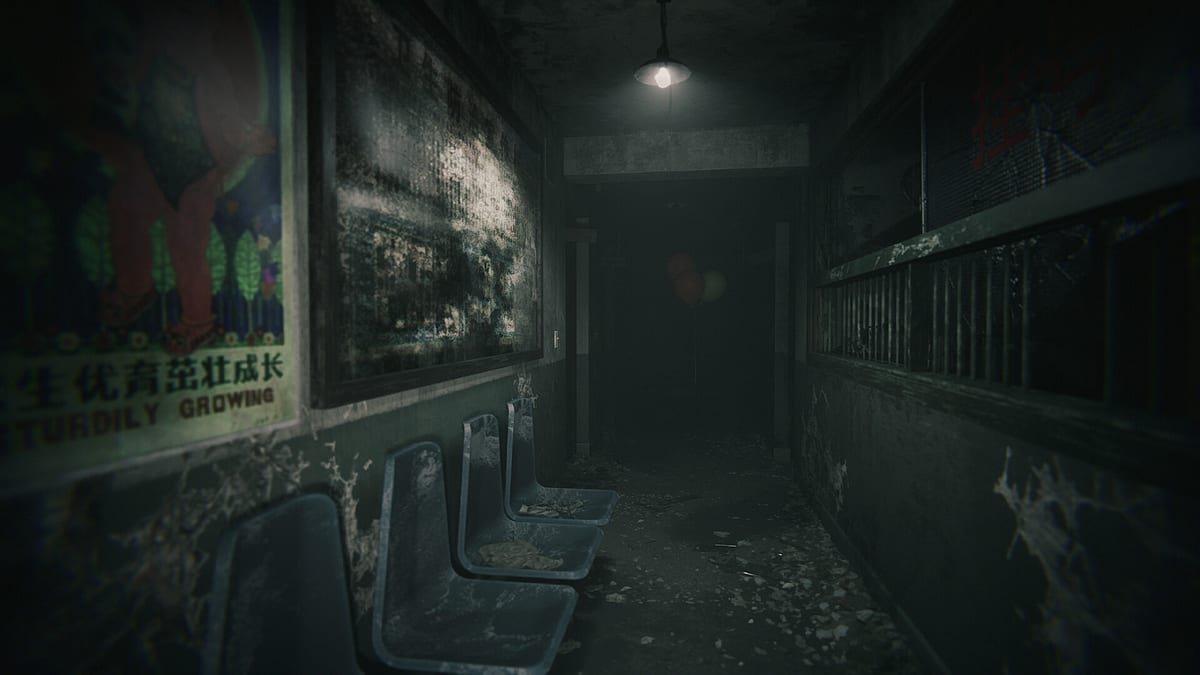
Hariti drops you into a Chinese hospital as a mother searching for Cindy, also called Xinxin in patient records. Ghostcase designed the opening as a slow burn: fluorescent lights, distant PA static, and paperwork that teaches you how to read environmental story without a quest marker glowing on every drawer. This guide covers default controls, why crouch pace matters, lantern discipline, and what a productive first hour looks like before you need the full Walkthrough or Hide and Seek pages.
Before you launch
Confirm you meet the listed specs: Windows 10, Intel i5 (or equivalent), 8 GB RAM, GTX 1060 class GPU, and about 5 GB free disk space. Hariti is a $6.99 single-player title on Steam (app 4018740); there is no multiplayer. If you only own the demo, play it to learn movement noise — then expect shifted layouts and additional wards in the full release. For purchase context, see the Hariti Review.
Set headphones on. Much of the early game trains your ears before it punishes your eyes.
Default controls and settings
Bindings may vary slightly by region or patch, but PC players report this layout:
| Action | Default key |
|---|---|
| Move forward / back / strafe | W A S D |
| Look | Mouse |
| Interact / use | E or left mouse (context) |
| Crouch | Ctrl or C |
| Sprint | Shift |
| Inventory / examine | Tab or I |
| Pause | Esc |
Open settings immediately and disable motion blur if you are sensitive — narrow corridors already compress depth. Turn subtitles on; bilingual signage and whispered VO carry clue words you will need for How to Find Cindy. If mouse sensitivity feels sluggish, raise it slightly; you will snap-look toward footstep audio during chases.
Crouch pace and noise floor
Hariti does not spell out a noise meter, but surfaces react consistently:
- Crouch-walking on tile or linoleum is your default exploration speed once you leave the introductory clinic.
- Standing walk is audible at short range; use it only when you know the hall is empty.
- Sprint spikes noise and triggers distant responses from the Woman in Red in mid-game chapters — treat sprint as a panic button, not traversal.
Practice crouch rhythm in the first corridor: move three steps, stop, listen. The game rewards micro-pauses with clearer audio panning. If you hear rubber-soled steps that are not yours, break line of sight and read Hide and Seek before you commit to a closet.
Lantern, medicine, and early items
Your lantern (or equivalent light source in the opening chapter) is both tool and tell. Shine it on red graffiti, balloon strings, and cracked portrait glass — those are Cindy threads, not decoration. Do not flash it wildly during hide segments; light silhouettes you through frosted glass.
Medicine pickups usually restore stability or reduce screen distortion depending on chapter. Pick them up after major set pieces, not in the middle of a chase. The key and crowbar you find in the first hour gate obvious shortcuts; crowbar panels often hide optional lore, not required progression. The walkthrough lists exact order if you sequence-break and lock yourself out.
First hour checklist
Use this route before you wander into optional wings:
- Complete the clinic tutorial interactables — every chart, clipboard, and phone message in the reception area.
- Pick up the lantern and test crouch on both tile and carpet — noise differs.
- Follow the first red balloon or child drawing until you reach a locked ward door; grab the key on the nurse station side path.
- Read the Mother’s journal page on the desk; it names Cindy/Xinxin explicitly and foreshadows the stillborn infant imagery later.
- Enter the first hide-and-seek tutorial closet when the audio mix drops bass — the game teaches safe UI here without a formal popup.
- Save at the administrative checkpoint (auto-save also fires, but manual save before stealth set pieces is habit-forming).
- Stop when you reach the dark ward transition — that is the natural pause before the Walkthrough mid-chapter puzzles.
When the Woman in Red first appears
The first sighting is usually scripted: distant red fabric, wrong proportions, no immediate chase. Do not sprint toward it. Back away, crouch, and note which corridor you came from — that becomes a loop escape route. Full detection rules and achievement notes live on Woman in Red.
Common first-hour mistakes
- Standing walk through the nursery hall — alerts the first patrol-style event early.
- Wasting medicine before any distortion event — leaves you shaky during the lantern-out sequence.
- Ignoring side room files — missing the Cindy nickname on a form makes later objectives feel vague.
- Skipping the demo lessons — players who jump straight to hard mode hospital wings without crouch practice fail the first Hide and Seek check repeatedly.
Where to go next
After the first hour you should have a key, lantern, basic medicine, and journal context. Continue with the Walkthrough for room progression, Hide and Seek for chase survival, and How to Find Cindy when the main objective text turns cryptic. Return to the Guides Hub anytime you need a topic map.
Frequently Asked Questions
Quick answers to the most common questions.
Should I play the Hariti demo before the full game?
Yes if you are unsure about motion sickness or pacing. The demo teaches crouch noise and light management; progress may not transfer, so revisit Getting Started for retail item locations.
What is the most important control habit in Hariti?
Crouch-walking by default and stopping to listen every few steps. Sprinting early attracts encounters and wastes escape routes in the first ward.
When should I use medicine in the first hour?
Save medicine for scripted distortion or post-chase recovery. Using it while exploring normal halls wastes the pickup before the first real stealth segment.
Is Hariti fully first-person?
Yes. Hariti is first-person psychological horror with no multiplayer. All movement and hiding tips in this guide assume a standard mouse-and-keyboard or controller first-person setup.